
Here's a summary of all user-facing changes on Superconductor from August 9-15:
Major Changes
Linear MCP support
Superconductor now supports Linear MCP, so agents can find, create, and update Linear issues, projects, and comments while they work.
Enable Linear from Project Settings -> Skills and MCPs, add a Linear API key, then reference Linear issues in tickets or chat when you want an agent to use issue context, update tracked work, or create follow-up issues.
Grok 4.6 support
Grok Build and Cursor now include Grok 4.6 profiles with Low, Medium, High, and Extra High reasoning effort.
We also benchmarked Grok 4.6 on our Custom SWE-Bench for Superconductor's Rails codebase, where it landed among our strongest coding-agent options.
Other Changes
Connect SuperGrok without pasting auth JSON
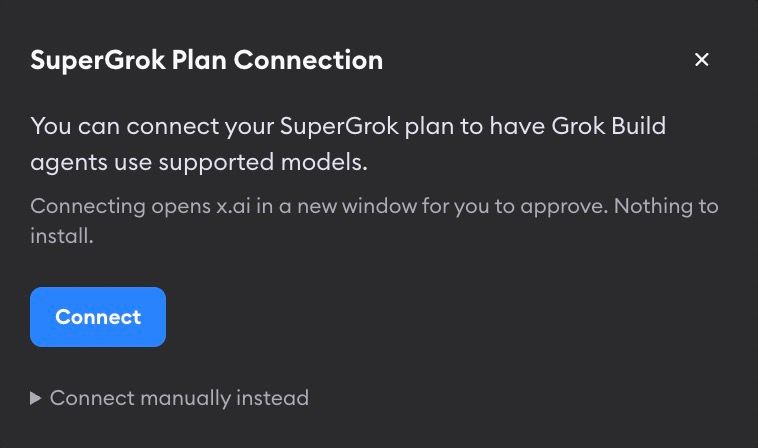
Before this change, connecting a SuperGrok plan usually meant running Grok locally and pasting auth JSON into Superconductor. Now the connection modal opens x.ai for approval and shows a confirmation code, so you can connect your plan from the browser with nothing to install.
Steer Claude Code while it is working
You can now send follow-up instructions to a Claude Code agent while it is still running, including while subagents are working. Previously, those messages waited for the current turn to finish before the agent could see them. Now Superconductor delivers them into the live run, so you can correct direction, add missing context, or answer a question without waiting for the turn to end.
Codex GPT-5.6 Max reasoning profiles
Codex GPT-5.6 Sol, Terra, and Luna profiles now include Max reasoning effort, giving you one more option when you want to spend extra reasoning on a harder implementation.
Generated titles, summaries, and recommendations use newer models
We updated several generated-text workflows to newer model defaults: pull request descriptions now use Claude Sonnet 5, implementation recommendations use GPT-5.5 High, benchmark evaluations include Claude Opus 5, and ticket-title generation can fall back to Gemini 3.6 Flash when the lighter Gemini model fails.
Environment setup cards are easier to manage in the Recent Activity sidebar
Environment setup items in the Recent Activity sidebar now use clearer Environment Setup: Project Name titles and have the same Hide and Unfollow menu behavior as implementation cards.
Workspace settings are easier to navigate
Workspace settings now follow the same section order as project settings, with day-to-day configuration above lower-frequency opt-in settings.
Dates and times are clearer
Older conversation messages now show the full date and time, and meeting times now display in the viewer's local timezone.
Fixed Issues
Ticket cards no longer skip the ticket page
Previously, clicking a ticket card with only one implementation opened that implementation directly. Ticket cards now open the ticket page first, so you can review the ticket details, attachments, and implementation list before choosing where to go next.
Grok Build results are cleaner
Grok Build implementations now show the agent's final response instead of including every mid-run narration chunk in the result message.
Have feedback or ideas for things you'd like to see on Superconductor? Let us know!