
Here's a summary of all user-facing changes on Superconductor from June 7-13:
Major changes
Grok Build is available to all users
We have some new agent options in Superconductor.
You can now add a Grok API key in Project Settings or Workspace Settings, then launch Grok Build agents.
You can choose from four Grok Build agents and four Composer 2.5 agents, with None, Medium, High, and Xhigh reasoning effort available for each.
New Granola skill
Superconductor now has a first-class Granola skill - add your Granola API key under Project Settings -> Skills and MCPs to enable it.
The Granola skill lets agents search and read your public Granola meeting notes. Agents can list notes, fetch summaries and metadata, and include transcripts when needed, making meeting context available while they plan or implement work.
Automations (Beta)
Automations let Superconductor run recurring project actions on a schedule. When enabled for a project, you can create scheduled workflows, run them manually, enable or disable them, and review past runs from each automation's history.
Automations now support three action types: create a recurring ticket, launch an implementation for a starred ticket, or send a message to a starred implementation.
Send us an email if you'd like Automations, currently in beta, enabled for your project.
Other changes
Submit pull requests from Slack menus
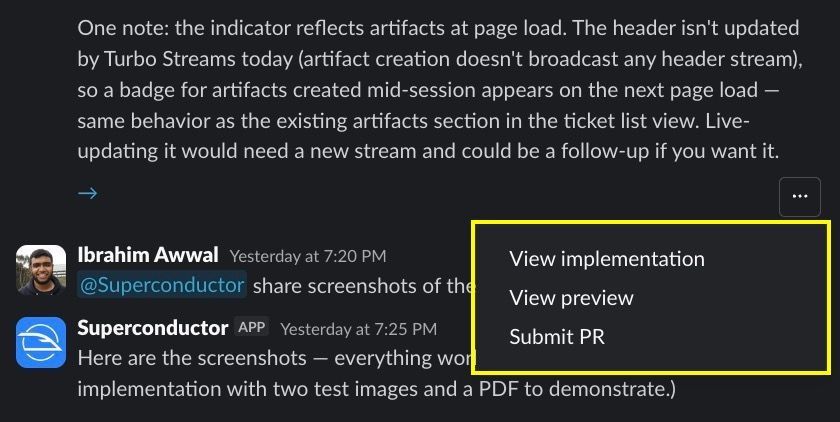
Slack implementation threads now show a Submit PR action in the overflow menu when no pull request exists yet, giving teammates another way to move an implementation toward review without switching contexts.
Meetings and emails appear in Recent Activity
Followed Meeting Assistant sessions and email triage conversations now appear in the Recent Activity sidebar alongside implementations. Sending a message on a meeting or email follows it automatically, so active conversations stay easy to find.
Desktop app navigation polish
The desktop app now supports browser-style zoom controls, native right-click copy and edit actions, and a smoother handoff back to the app after signup.
Faster project pages for large ticket lists
Large projects should now feel faster to search and browse. Ticket lists stay responsive as you move through more results, and starred tickets and filters keep their expected ordering.
More complete Claude Code work logs
Claude Code work logs now render newer tool types such as Workflow, ScheduleWakeup, TaskList, notebook edits, cron tools, and worktree switches. That makes long-running Claude Code sessions easier to follow inside Superconductor.
Fixed issues
Guided Review waits for code changes
Superconductor now prevents Guided Review from starting before an implementation has reviewable code changes. Instead of silently failing, the review button stays disabled until there is something to review.
Codex errors and costs are clearer
Codex model-access failures now point users toward the right API key settings, transient OpenAI stream failures explain that retrying is appropriate, and Codex cost calculations are more accurate for long-context runs and special agents such as the Meeting Assistant.
Benchmark specs generate more reliably
Benchmark ground-truth pull requests now avoid an Anthropic request option that caused spec generation to fail for newer Opus models, so benchmark setup is less likely to leave PRs without generated specs.
VTT transcript uploads work more reliably
Ticket creation now accepts .vtt transcript files even when browsers or upload tools label them with a generic MIME type, and ticket creation failures around file uploads surface more cleanly.
Automation-created implementations appear in Recent Activity
Implementations launched by automations are now followed by the automation owner, so they show up in the Recent Activity sidebar just like manually launched work.
Invalid meeting links show feedback
When you submit an invalid Microsoft Teams meeting link to the Meeting Assistant, the Meetings page now shows a clear error instead of appearing to do nothing.
GitHub artifact links resolve correctly
Artifact links included in GitHub comments now use absolute Superconductor URLs, making screenshots and generated files easier to open from PR discussions.
Pi work logs are cleaner
Pi agent output now strips partial payload fragments before sending worklog updates to Superconductor, so Pi sessions are easier to read.
Removed workspace members stop receiving followed activity
When someone is removed from a workspace, their follows in that workspace are cleaned up, preventing stale activity notifications for projects they can no longer access.
Network defaults are narrower
Playwright and Sentry domains are no longer trusted globally for every project. They are added only when the related MCP or skill is enabled, keeping project network access closer to the integrations you actually use.
Have feedback or ideas for things you'd like to see on Superconductor? Let us know!