
Agents in Superconductor can now connect to Atlassian Rovo MCP, giving them access to Jira context while they work on tickets.
Ask an agent to pull in a Jira issue, read the spec, summarize related work, or use issue details to tighten its implementation plan. If your service account has write permissions, the agent can also update Jira as part of the workflow.
This is especially useful when Jira is the source of truth for product and engineering work. PMs can keep planning in Jira, engineers can keep review in Superconductor, and agents can bridge the two during implementation.
Some useful Jira workflows this opens up:
- Start from a Jira issue and ask the agent to use the issue spec while planning the Superconductor ticket
- Have the agent search for and summarize linked or related Jira issues before it changes code
- When review turns up a regression, ask the agent to draft or create a follow-up Jira issue with repro steps, depending on the permissions you gave the service account
- Ask the agent to leave a status comment on the related Jira issue when the Superconductor implementation is ready for review
Atlassian Rovo MCP can also expose Confluence, Compass, Jira Service Management, Bitbucket, and Teamwork Graph tools when your Atlassian token has the required scopes. We focus on Jira here because it is the most common coding-agent workflow.
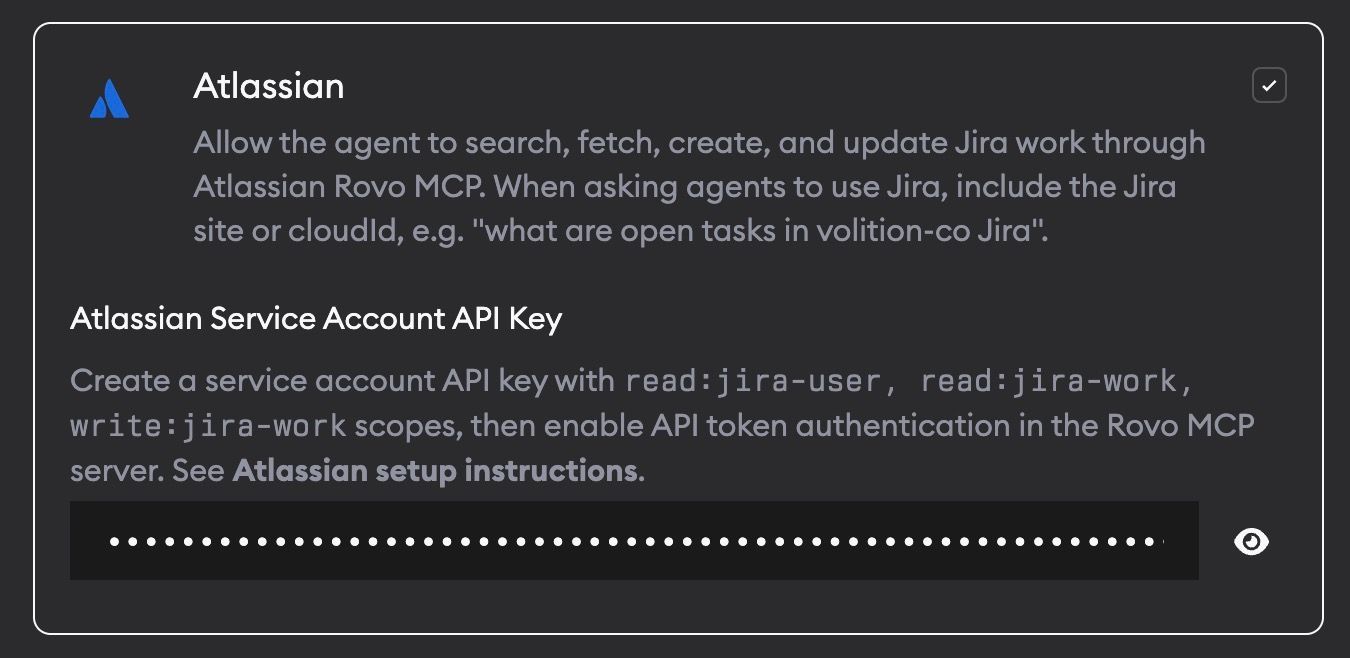
To enable the integration, go to Project Settings -> Skills and MCPs, enable Atlassian, and provide an Atlassian service account API key. Superconductor stores the encrypted key and only passes it to agents when Atlassian MCP is enabled.
Have an MCP or integration you would be excited to see in Superconductor? Let us know.