
Here's a summary of all user-facing changes on Superconductor from May 17-23:
Major changes
Atlassian Rovo MCP support
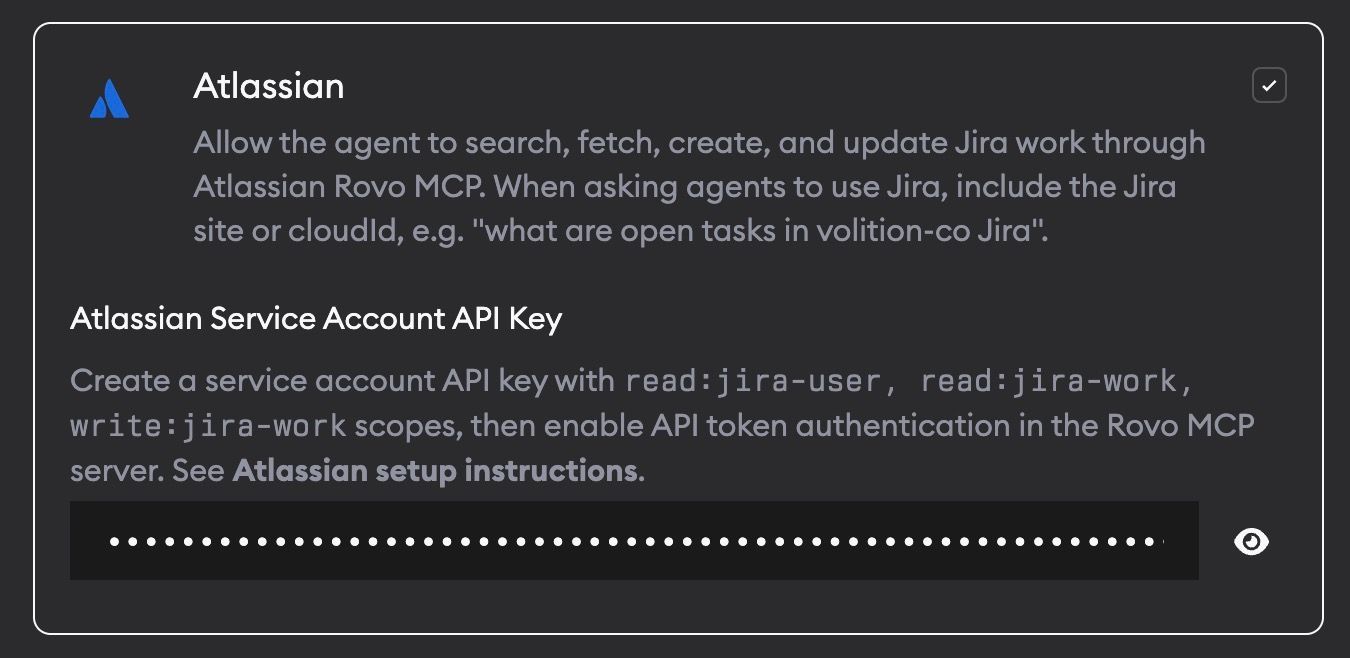
You can now enable Atlassian Rovo MCP from Project Settings -> Skills and MCPs. After you add an Atlassian service account API key, agents can search Jira, read issue details, create and update issues, add comments, and use Jira context while planning or implementing a ticket.
Other changes
Create pull requests from Slack
You can now reply @Superconductor pr in an implementation Slack thread to create a pull request. If a PR already exists, Superconductor replies with the existing link instead of creating a duplicate. When it creates a new PR from Slack, Superconductor also requests review from the user who asked for it when their GitHub account can be matched.
More secure live preview URLs
Live preview URLs now use Superconductor-owned domains instead of exposing raw sandbox hostnames directly. This gives teams safer preview links that require Superconductor login while keeping the in-app preview experience the same.
Clearer agent credential settings
Project and workspace agent credential settings now link directly to Account Settings, making it easier to find where to set your preferred default agent.
Mobile notification polish
iPhone users who open Superconductor on the web now get the native App Store banner when their browser supports it and they do not already have the app installed. Android web push notifications also use a dedicated Superconductor badge icon.
Fixed issues
Empty GitHub repositories work with new agent runs
When a project is linked to a brand-new empty GitHub repository, Superconductor now creates an initial README.md file in that repo. This avoids failures when agents try to clone, branch, or create PRs against an empty repo.
Fewer repeated network access prompts
When a domain is already allowed by the current network policy, agents should no longer keep uploading duplicate network-access requests for that same domain.
Network violation links go to the right settings page
Network access warnings now include clearer text about where to allow all network access, and the Project Settings link opens the correct Network Access page.
OpenCode invalid API key errors are clearer
OpenCode runs that fail because of an invalid API key now show the API-key validation error directly instead of falling through to a less useful execution failure.
Better error messages for background assistants
Environment Setup, email triage, and meeting assistant runs now show the parsed callback error when async execution fails, so quota and setup problems are easier to diagnose.
Have feedback or ideas for things you'd like to see on Superconductor? Let us know!