
Test your app with Playwright and Superconductor coding agents
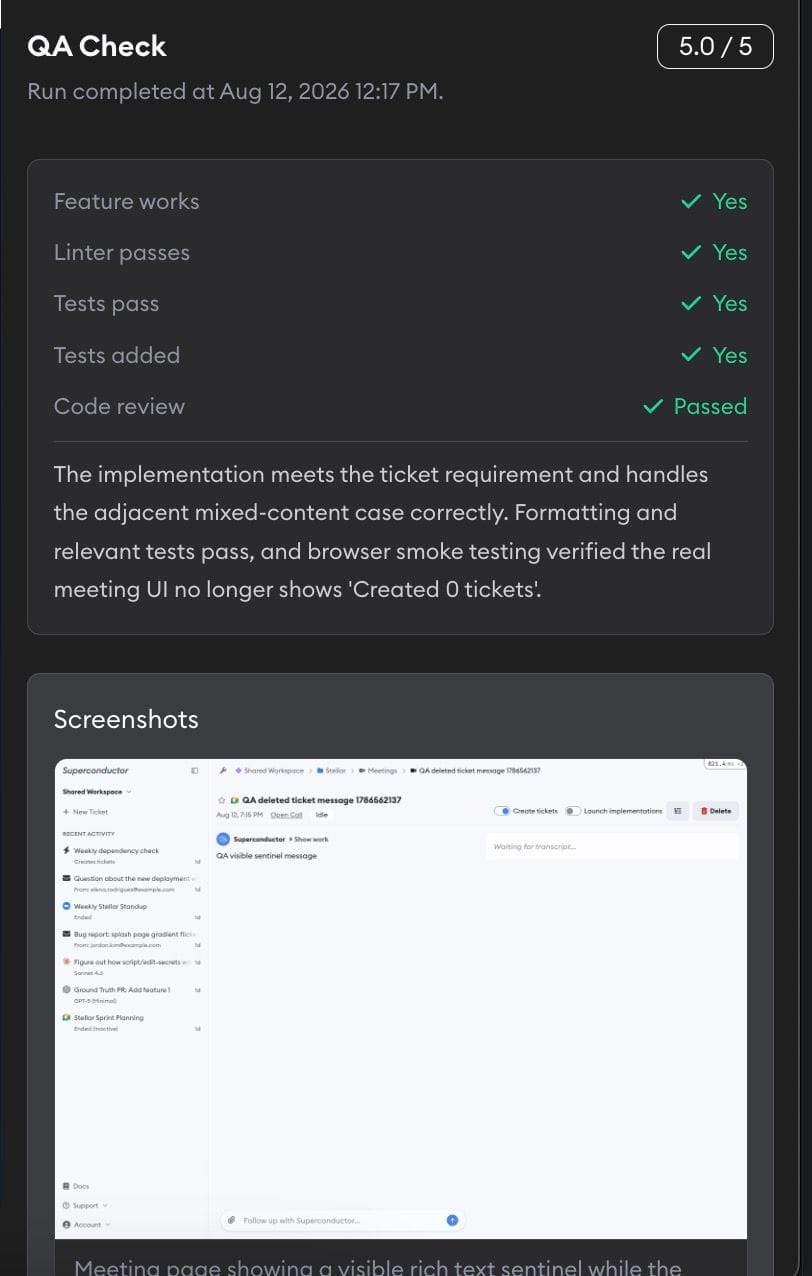
Turn on Playwright for a project, and agents click through the live preview to check forms, layouts, and console errors. Superconductor posts those screenshots to the shared chat, so your team can review UI changes without running the app.
Turn it on in Project Settings → Skills and MCPs.
Superconductor lets you and your team chat with coding agents such as Claude Code, Codex, Pi, and more in shared, secure cloud sessions.
With our Playwright integration, you can
- Check that a form submits or a modal opens
- Review UI changes from screenshots posted to the chat
- Check layouts at desktop and mobile widths
Technical details
- Used for
- Navigating, clicking, forms, screenshots, console errors
- Needs
- Playwright turned on in Project Settings → Skills and MCPs; a working live preview
Example
Questions
- Does it use the official Playwright MCP server?
- Yes. Agents use Microsoft's Playwright MCP (
@playwright/mcp) to control a headless browser. - Do I need an API key?
- No. Playwright doesn't need an API key; you only turn it on in Project Settings.
- Do I need to allow browser download domains in Network Access?
- No. Superconductor adds the network access Playwright needs to download and run browsers. If you run Playwright yourself,
cdn.playwright.devis already in the trusted package registries.