
Run Codex as a team in Superconductor
Connect your ChatGPT plan or OpenAI API key to Superconductor and your whole team can run Codex on cloud computers everyone can watch. With Superconductor, your team can watch each Codex session, compare it with other agents on the same ticket, and pick it up from Slack, GitHub, or mobile.
Superconductor lets you and your team chat with coding agents such as Claude Code, Codex, Pi, and more in shared, secure cloud sessions.
With our Codex integration, you can
- Run Codex and Claude Code on the same ticket
- Pick the reasoning level for each run
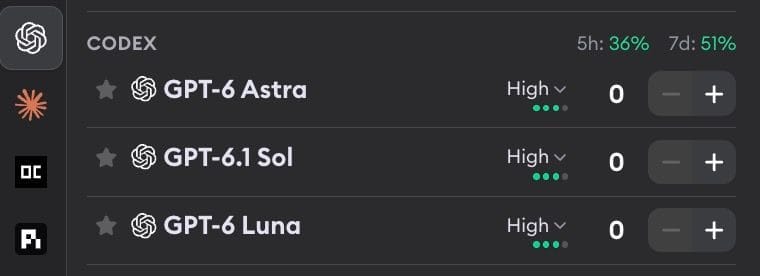
- See how much of your ChatGPT plan you've used before you launch
Technical details
- Runs on
- ChatGPT plan (Plus and higher), OpenAI API key, or credits
- Models
- GPT-6 Astra, GPT-6.1 Sol, and GPT-6 Luna, five reasoning levels
- Repo config
- MCP servers from
.codex/config.toml
Example
Questions
- Can I use my ChatGPT Plus plan with Codex?
- Yes. Plus, Pro, Business, Enterprise, and Edu plans all work. Free and Go plans can't run Codex here because OpenAI only includes Codex CLI sign-in from Plus upward, but an OpenAI API key works with any plan or none.
- What happens when my ChatGPT plan hits its limit?
- The run stops, and the chat says when the limit resets. Superconductor doesn't switch to an API key mid-run.
- Can teammates message Codex while it's working?
- Yes. Anyone in your workspace can post in the chat, and Codex picks the message up when it finishes its current task. Only Claude Code takes new messages mid-turn.