Codex
Superconductor is the best place to run Codex in the cloud.
Credentials
Superconductor supports two ways to authenticate Codex:
- ChatGPT plan: Connect your ChatGPT account via OAuth in your Account, Project, or Workspace settings. Your connected plan is used when you launch an implementation directly. Any tier can connect, including free and Go, but the models you get depend on your plan — see Availability.
- API Keys: Configure your OpenAI API key at the Project or Workspace level. Used when a connected ChatGPT plan isn't available for the launch.
See Agent credentials for details on precedence rules.
Models
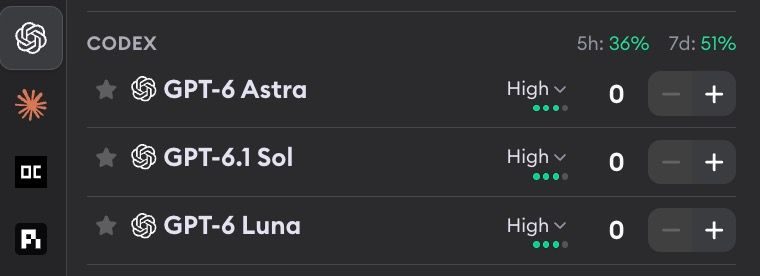
Codex supports the following models:
- GPT-6 Astra - OpenAI's most capable model, built for complex coding, reasoning, and long multi-step work. It's the priciest of the Codex models, so reach for it on the hard tickets.
- GPT-6.1 Sol - The latest Sol model and the balanced GPT-6 option for complex coding, reasoning, and polish. Used first in Superconductor's best available credential fallback.
- GPT-6 Luna - The fastest and most cost-efficient GPT-6 option for simpler or high-volume work.
Codex models support configurable reasoning effort levels. Pick a level from the dropdown next to each model.
| Model | Reasoning levels |
|---|---|
| GPT-6 Astra, GPT-6.1 Sol, and GPT-6 Luna | Low, Medium, High, Extra High, Max |
What are reasoning effort levels? Reasoning effort controls how much computation the model uses when thinking through a problem. Low is fastest and cheapest, for quick, well-scoped tasks. Medium offers a good balance of speed and quality for most tasks. High increases deliberation time for better results on harder problems. Extra High and Max push deliberation further still, producing the best results for complex tasks but with higher cost and latency.
Learn more about OpenAI models in the OpenAI model guide.
Availability
A connected ChatGPT plan needs to be Plus or above. Superconductor runs the Codex CLI, and OpenAI only includes CLI sign-in from Plus upward — free and Go accounts get Codex in the ChatGPT desktop app, not the CLI. So a connected free or Go plan can't run Codex here at all. Plus, Pro, Business, Enterprise, and Edu all work. An OpenAI API key works on any tier, including with no ChatGPT plan at all.
See OpenAI's Codex model documentation for current plan availability.
Usage stats
If you've connected your ChatGPT plan, Superconductor shows your rate limit utilization next to the agent name. Plus shows two numbers, 5h and 7d, while Pro shows a single 7d. See Usage stats for details.