GitHub
Tag @superconductor in pull requests to request changes, launch agents, and iterate on code without leaving GitHub.
Enabling the GitHub integration
GitHub is connected at two levels:
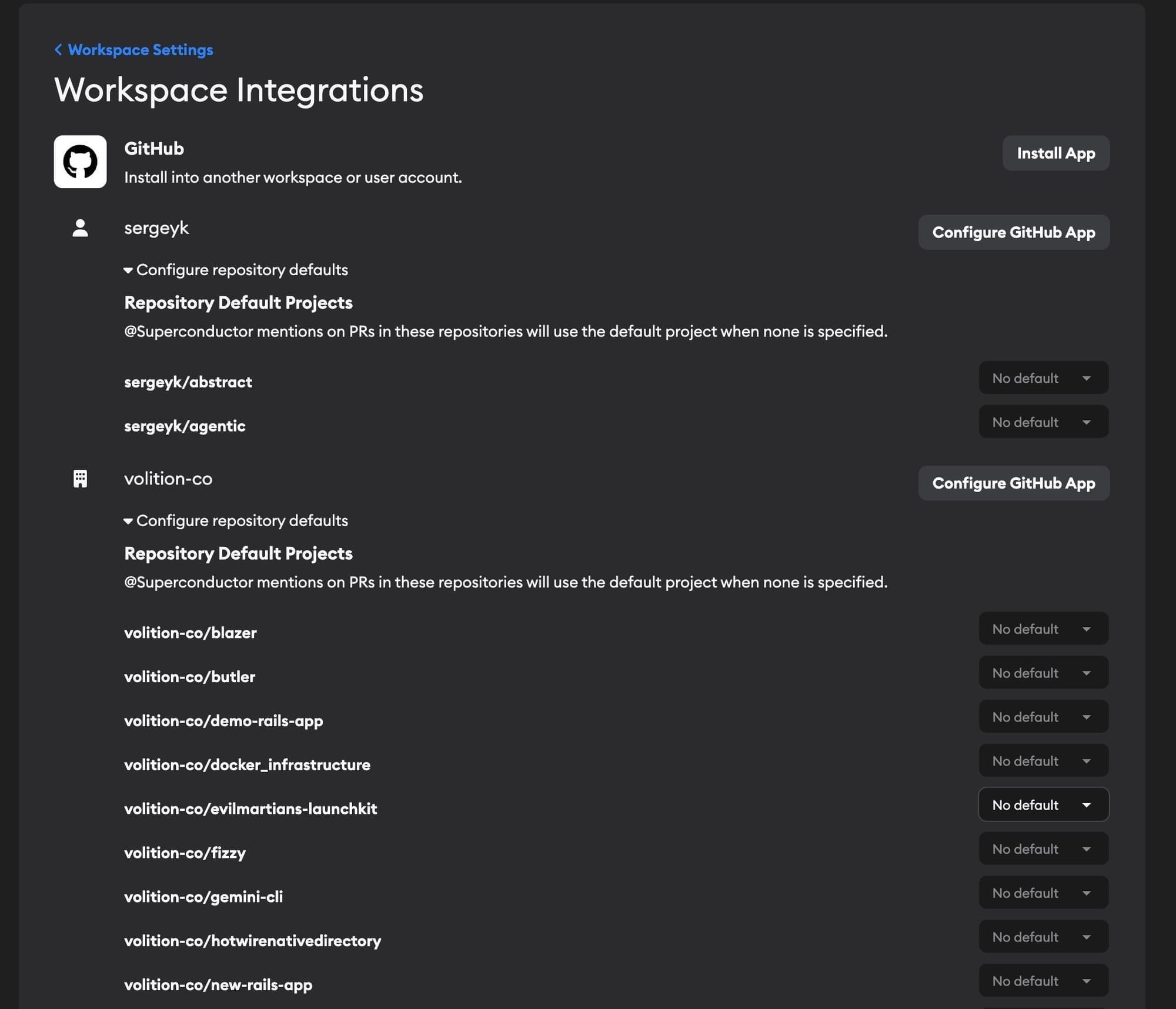
- Workspace — Install the Superconductor GitHub App on your GitHub organization or account during workspace setup. This gives your workspace access to repositories. If you create additional workspaces, you'll be prompted to connect GitHub for each one. You can manage installations and set repository defaults in Workspace Settings → GitHub.
- Project — Link specific repositories to a project when creating or editing the project. Projects can only use repos that are already connected at the workspace level. Repos are optional; see Projects without repositories.
Why do I link repos at both levels? The workspace connection determines which repos Superconductor can access. The project-level link determines which repos a specific project's agents will work in. This lets you give your workspace access to all your organization's repos while scoping each project to just the repos it needs.
If you connect an empty GitHub repository with no branches, Superconductor will create an initial README.md commit so agents can clone the repo and start work.
Creating pull requests from Superconductor
You can create and manage pull requests directly from the Superconductor app. See Creating pull requests in the Implementation docs for details.
AI-generated PR descriptions
When Superconductor creates a pull request, it automatically generates a PR description using AI. The description summarizes what changed and why based on the ticket, the conversation between you and the agent, the commit message, and the diff itself.
The generated description includes:
- A brief summary of the changes
- Key changes as bullet points
- Screenshots or visual changes, if the implementation produced any artifacts
For detailed walkthroughs of files, review order, and diff-specific commentary, use Guided Review. For an independent quality score and follow-up list, use QA Checks. The PR description stays intentionally concise.
If your repository has a pull request template, Superconductor will follow its structure when generating the description.
PR descriptions are generated using Superconductor's own infrastructure and API keys — this doesn't use your account's API credentials or count against your usage. If the generation fails for any reason, Superconductor falls back to using the raw ticket description.
Every PR created by Superconductor also includes links back to the ticket implementation, the app preview (if available), and the guided review at the bottom of the description.
Tagging Superconductor in GitHub
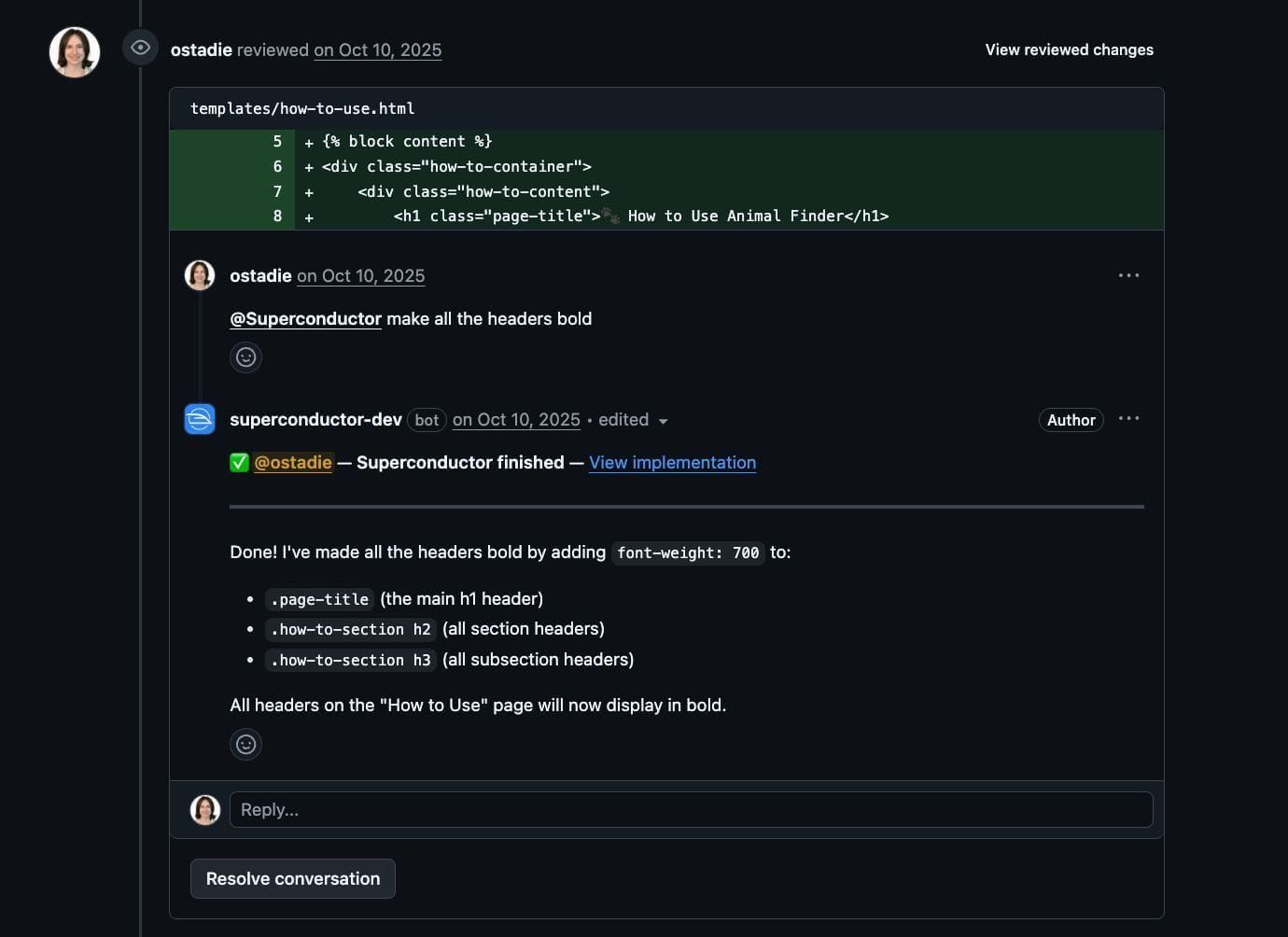
Tag @superconductor or use /sc in PR comments (including inline review comments) to interact with agents:
- Existing implementation: If the PR has an associated Superconductor implementation, the agent will work in that context and respond to your comment.
- New implementation: If not, a new ticket and implementation will be created in the Superconductor project linked to this repo that best matches your workspaces.
This lets you request changes, ask questions, or get help directly from GitHub without switching to the Superconductor app.
When a Superconductor user is requested as a reviewer on a Superconductor PR, they're automatically added as a follower of the implementation and will see it appear in their Activity Sidebar.
PRs created outside of Superconductor
Configure how Superconductor handles PRs created outside the app in Project Settings. You can leave them alone, launch a preview environment, or launch a preview environment and automatically generate a Guided Review. When either launch option is enabled, any new PR opened on the project's repositories automatically creates a linked Superconductor ticket. See Treatment of PRs created outside of Superconductor for details.
Matching repos to projects
You can set default projects for repositories in Workspace Settings → GitHub. This determines which project is used when @superconductor mentions on PRs in that repository create new tickets. If no default is set, Superconductor will try to find a matching project automatically. If it can't determine which project to use, it will reply on the PR asking you to specify one.
Running automations when a pull request is merged
Superconductor can run a project action when a pull request is merged in a connected repository. Create an automation with the On a GitHub event trigger, then choose which repositories and base branch it should watch. The automation can create a ticket, launch an implementation, or send a message to an agent. A throttle period stops a burst of merges from starting a run each time.
See Automations for the full setup.
Tips for using the GitHub integration
Choose a specific model

When you don't specify a model, Superconductor uses your Default agent profile from Account Settings — the same setting is shared by the Slack, GitHub, and Linear integrations.
If you haven't set a default, or the profile you chose isn't configured for the project the request targets, Superconductor falls back to the best available profile. It picks the first agent in that order for which your project has valid credentials configured.
To pick a specific model instead, add model:MODEL_NAME to your comment:
@superconductor model:claude_opus Fix the failing test in auth_controllerYou can also use quotes for model names with spaces: model:"gpt-6.1-sol medium". Models are matched fuzzily, so model:opus will match claude_opus.
If none of the default models have configured credentials, Superconductor will let you know and list available models. You can specify a different model using model:MODEL_NAME, or configure credentials in your Project or Account settings.
Specify a project
If a repo belongs to multiple projects, tell Superconductor which one to use with project:PROJECT_NAME:
@superconductor project:"My Project" Add dark mode supportIf the repo only belongs to one project, you can skip this — Superconductor picks it automatically.
Use inline review comments for file-specific requests
When you mention @superconductor in an inline review comment on a specific file or line, the agent automatically gets the file path, line numbers, and diff context. This is a great way to point the agent at exactly the code you want changed.
View directory of projects and models
Type @superconductor help to see a list of available projects and models you can use.
Support for Issues, Projects, and Wikis
We currently do not support GitHub Issues, Projects, or Wikis as ticket sources. Please let us know if you'd like us to!