Benchmark
Define your own benchmark using "ground truth" pull requests that your team is proud of, and see how different coding agents perform on it.
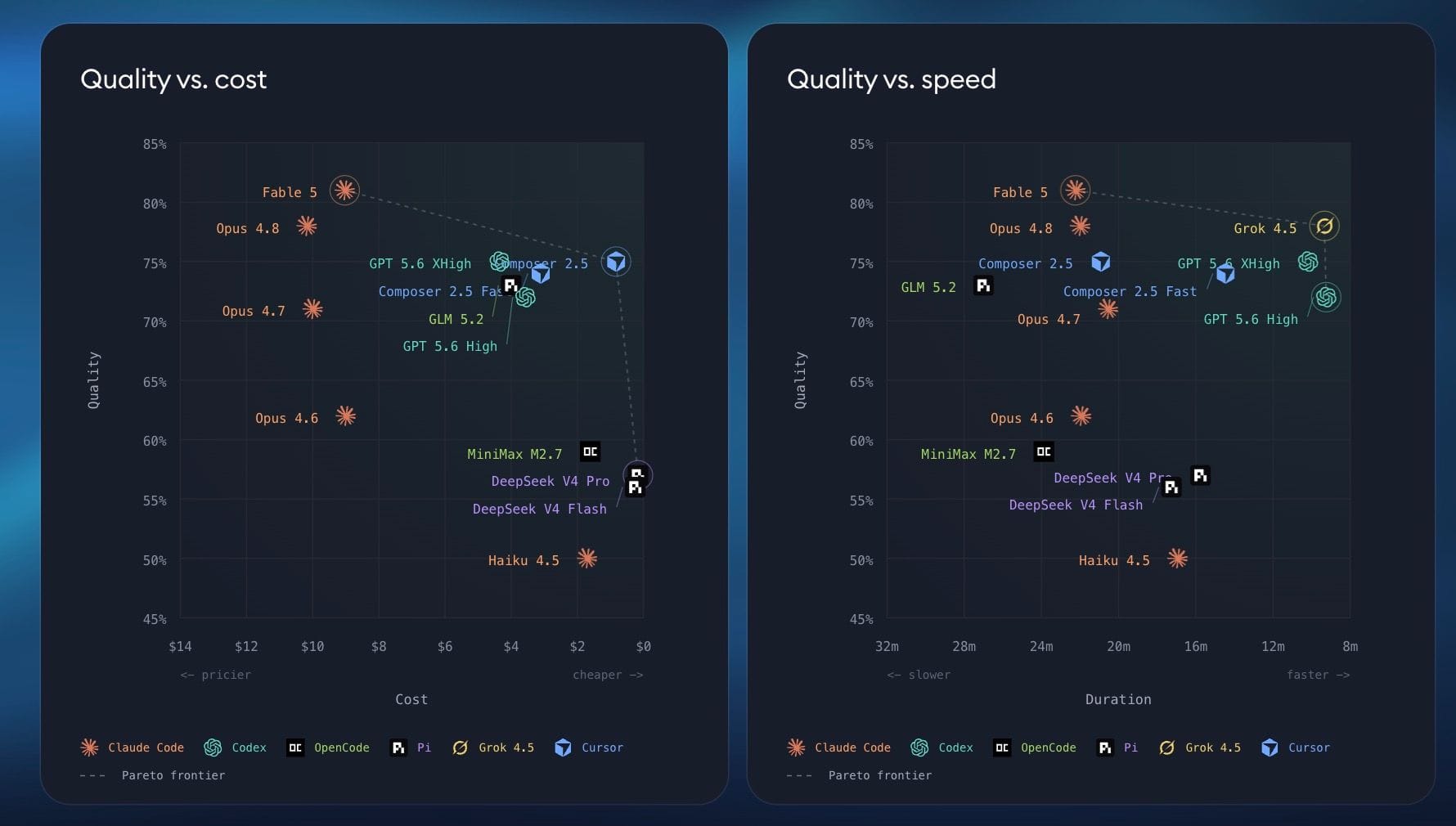
Benchmarking helps you find the best coding agent for your specific codebase by comparing quality, cost, and time across agents using real pull requests from your project.
To access benchmarks, open a project and click Benchmark in the project header. From there, you can add Ground Truth PRs, choose agents, and start new runs.

Want to see a public example first? See Superconductor's public benchmark results for a broader comparison of coding agents.
Workspace members with the Owner, Admin, and Developer roles can access and manage project benchmarks. Viewers cannot access the project Benchmark page.
Running your first benchmark
On the Benchmarks page, add at least one Ground Truth PR and select at least one available agent profile. Once both are in place, Superconductor automatically launches your first benchmark as the Default run. The Default run becomes the baseline for any additional runs you create later.
Ground truth pull requests
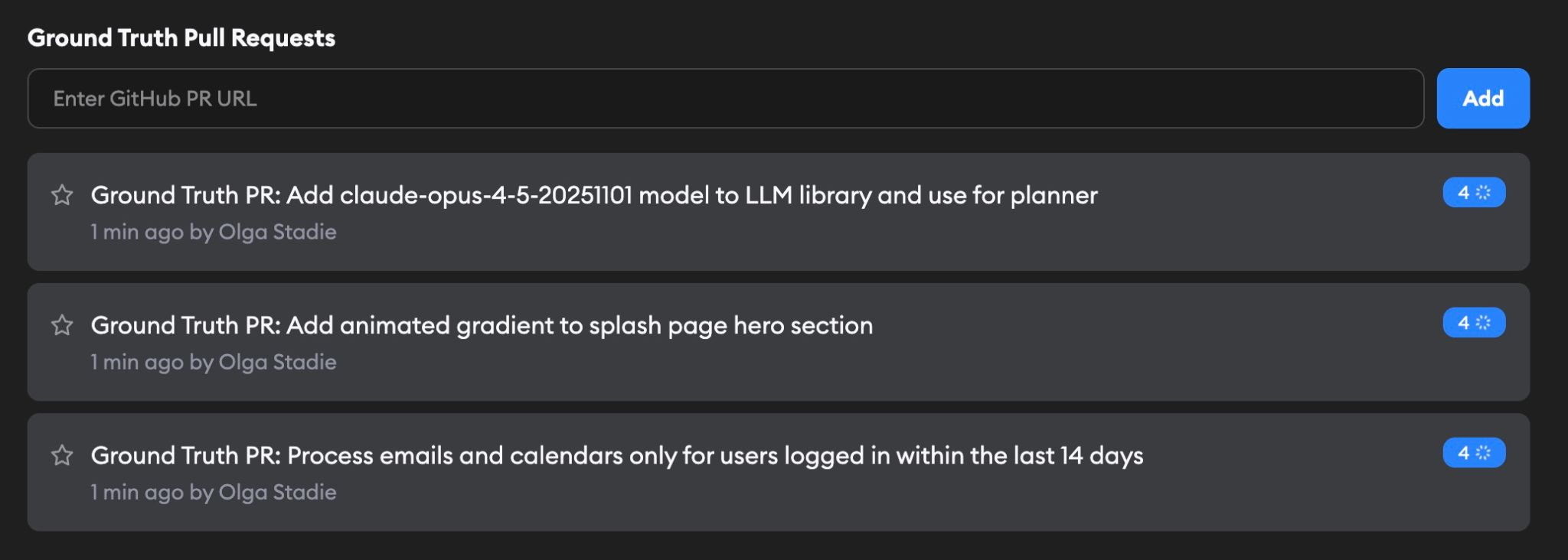
Select some Ground Truth PRs from your project repos that you think are examples of good dev work.
For each PR, Superconductor works out the original spec, then tasks each agent with implementing it. If the PR came from a Superconductor implementation anywhere in this workspace, we reuse that ticket's description, along with any images, videos, and file attachments on the original ticket. That way agents start with the same context the original author had. Otherwise, an AI evaluation agent infers the spec from the PR itself.
To redo a spec, open the benchmark ticket and click Regenerate spec next to Description. This is handy when the inferred spec missed something important. Superconductor works out the spec again from the PR data it already has, and replaces the ticket description. Implementations that already ran keep their results — rerun them to benchmark against the new spec.
Agents

The Agents section shows which coding agents will be tested in your benchmark runs. Configure these by clicking Edit on the Benchmark page.
Only agents with configured API keys are available for selection. If an agent is grayed out, add its API key in Project Settings → Agent Credentials first.
You can configure agents and additional settings from the Benchmark Settings page.
Gemini models are available through OpenCode, Factory Droid, and Cursor. Select a Gemini profile under one of those agents. Gemini API keys in Project or Workspace settings are only used for Gemini-powered Superconductor skills, not benchmark agent runs.
Benchmark settings
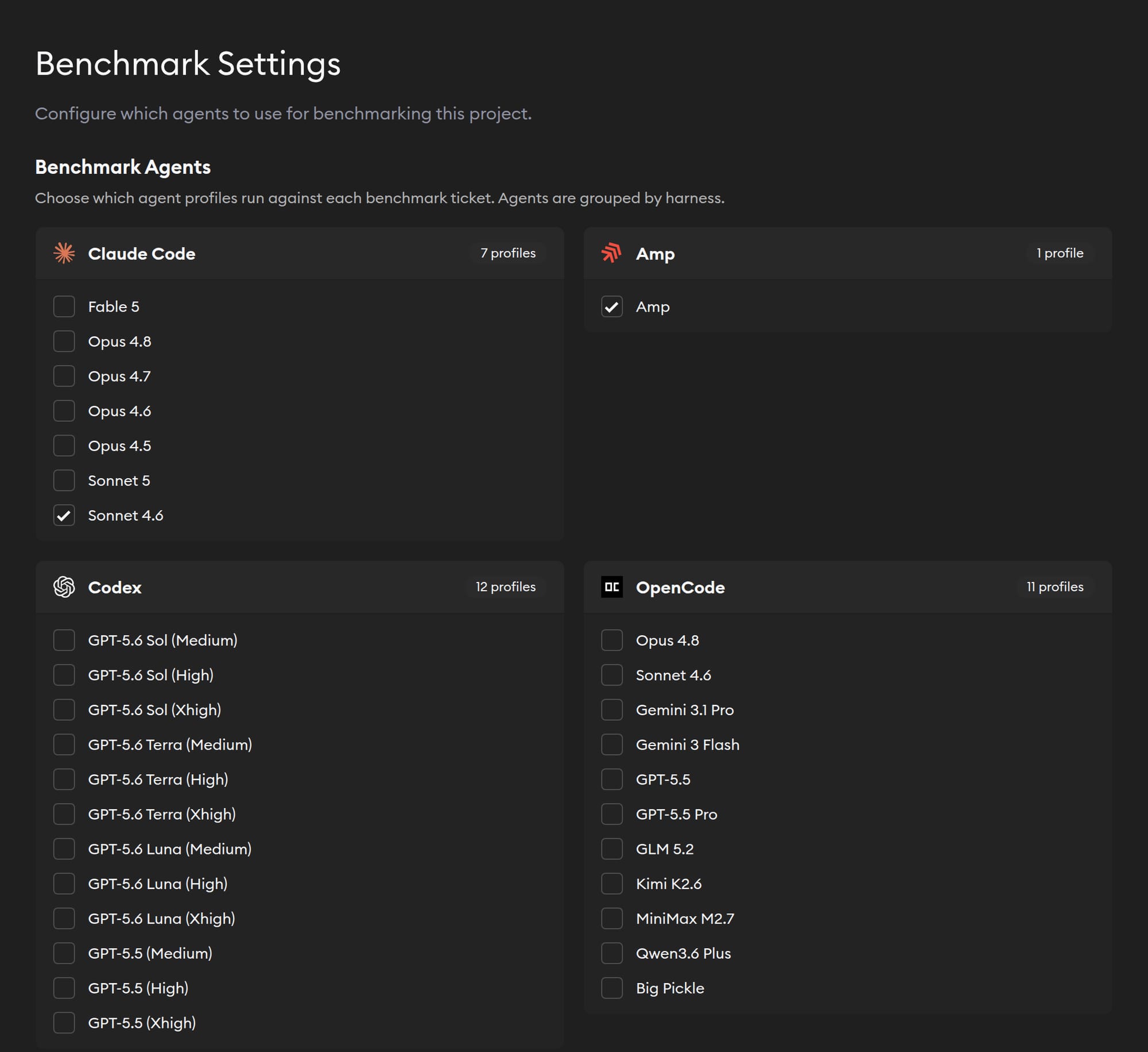
Click Edit on the Benchmark page to configure:
- Benchmark Agents — Choose the agent profiles that run against every benchmark ticket. Profiles are grouped by agent harness. Profiles without the required credentials are disabled; add credentials in Agent Credentials to make them available.
- Implementations Per Agent — Choose how many times each selected profile runs against every Ground Truth PR. You can run between one and five implementations per profile and PR.
- Run QA checks (optional) — If your project has QA Checks enabled, turn this on to run a QA agent on every benchmark implementation before the judges score it. Superconductor uses the best available agent for the QA agent.
- Benchmark Startup Commands (optional) — Add commands that prepare each benchmark implementation environment. These override the Project Environment startup commands for benchmark runs. You can run long-lived processes in the background; the last command always runs in the background. Project secret variables are available to these commands.
Changing these settings adds any missing implementations to your existing runs based on the current Ground Truth PRs and selected profiles.
Evaluation and results
Each agent's implementation on each Ground Truth PR is then evaluated by multiple LLM judges on a rubric covering correctness, completeness, and code quality. Runtime and cost are tracked as well.
Do I need API keys for the judges? No. You only need credentials for the agents you want to benchmark — that's what makes an agent selectable in the Agents section. The judge models are separate, and Superconductor covers them.
If your project or workspace happens to have an Anthropic, OpenAI, or Gemini key, we use it for the matching judge, checking the project key first and then the workspace key. For any judge you don't have a key for, we use Superconductor's key. So a project with only a Cursor credential can still benchmark Cursor and get fully scored results.
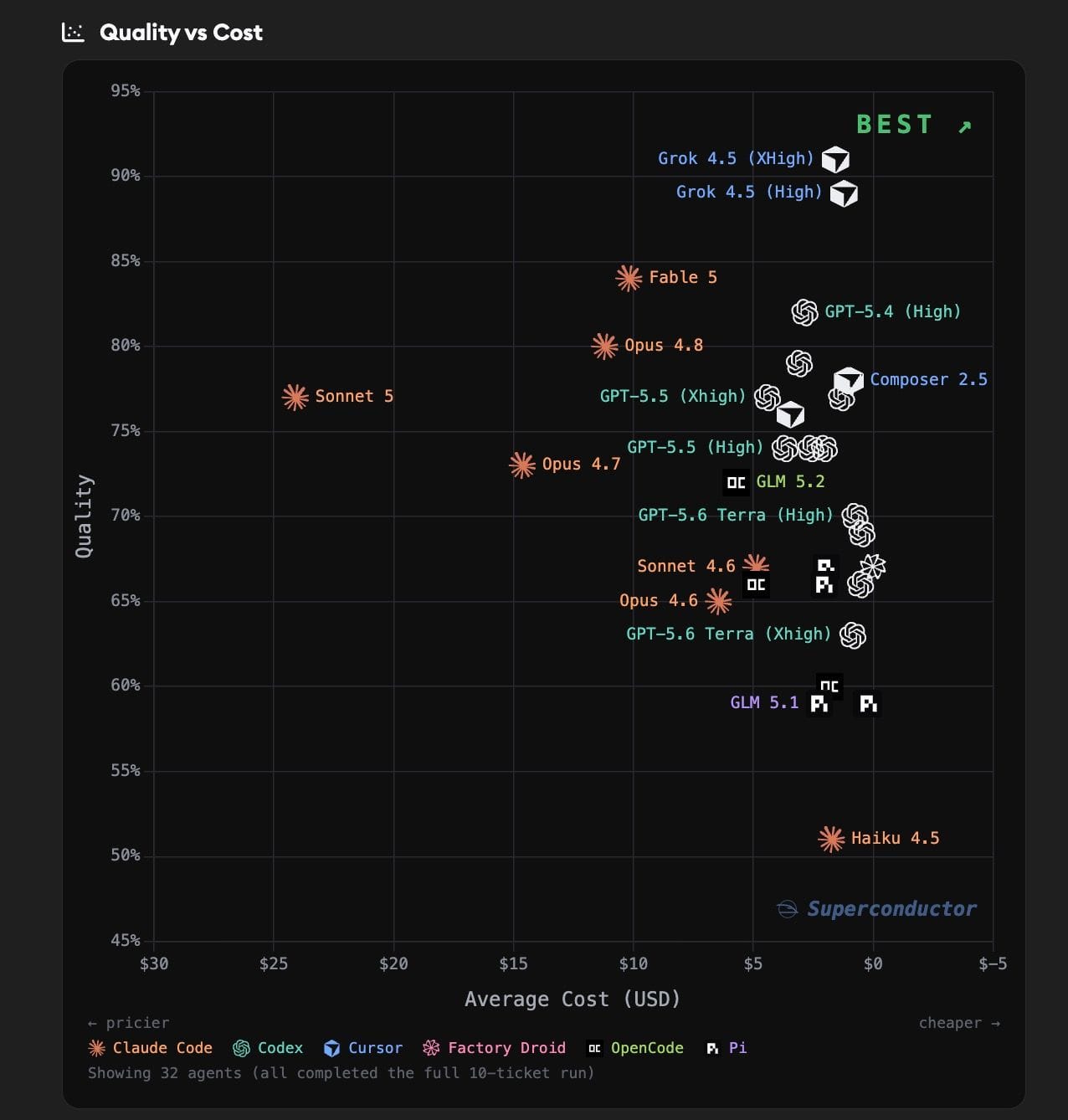
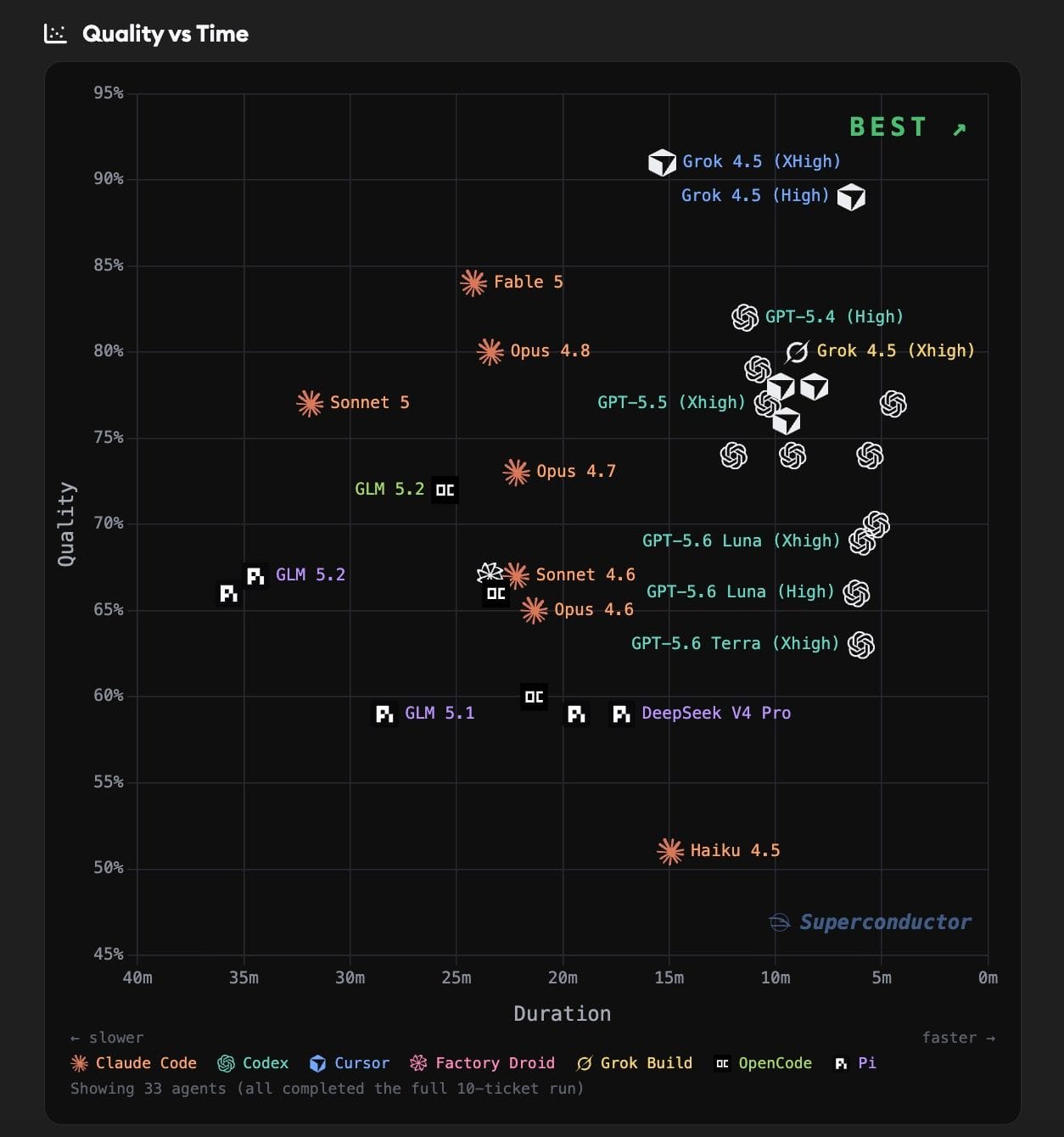
Use Select Agents at the top of Results to filter the agents shown throughout the charts and tables.
The Quality vs Cost and Quality vs Time charts let you compare agents across both dimensions. The quality score is a normalized 0-1 value derived from three 1-5 ratings: correctness, completeness, and code quality, averaged across all three evaluation models.
Hover over any point on the charts to see detailed metrics for that agent. Drag to zoom into a region, Ctrl-drag to pan, or pinch to zoom on a touch device. Click Reset Zoom to return to the default view.
The Task Score Heatmap shows every agent's score on every benchmark ticket. Each row is an agent, each column is a ticket, and the mean column summarizes the agent's overall score. Cells are color-coded by score and shaded by rank, with outlined crown markers for each ticket's winners and hatching for failed runs without scores.
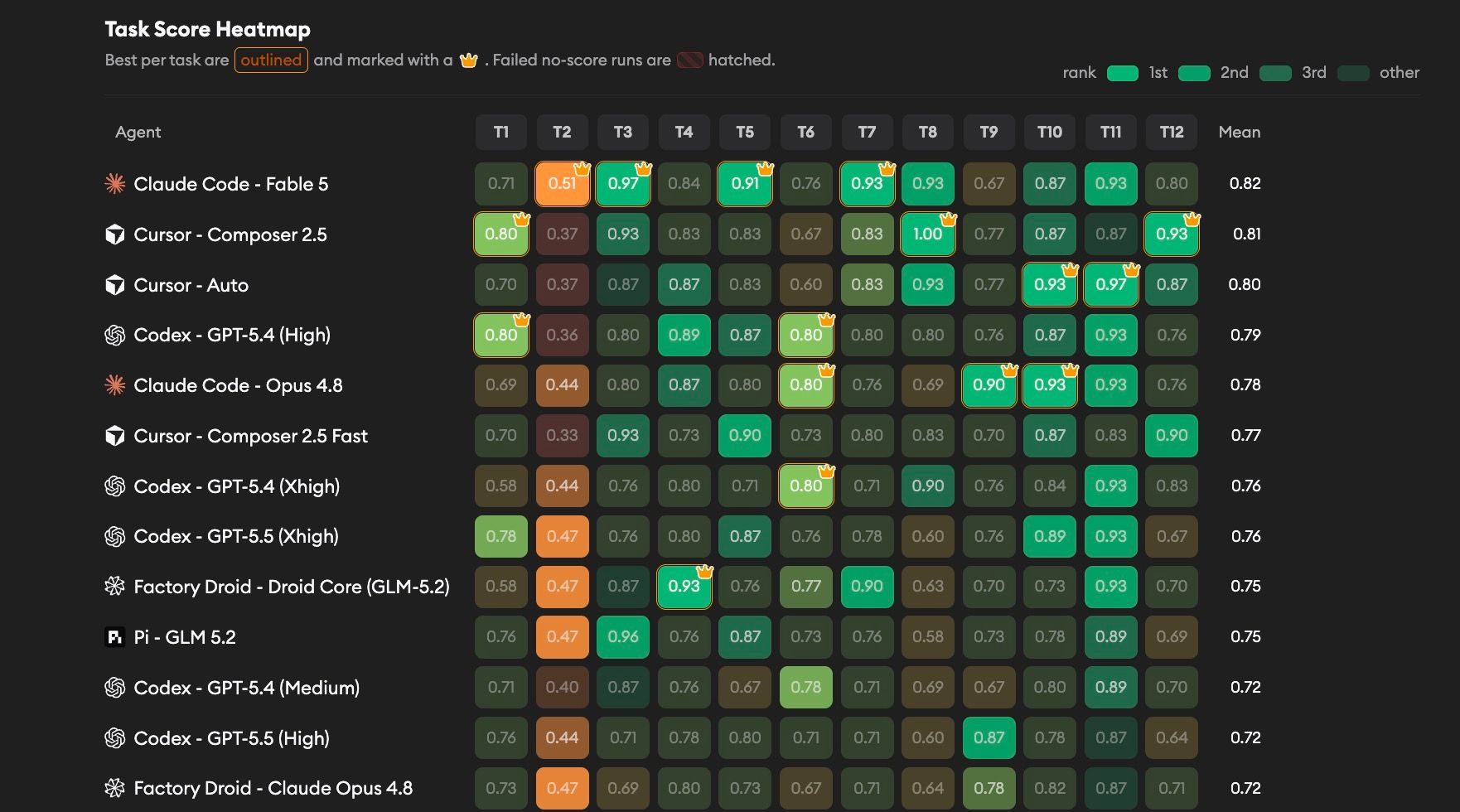
Below the charts, you'll find an Aggregate Results table summarizing each agent's average quality, time, and cost, followed by Results by Ticket tables that break down performance per Ground Truth PR. Each ticket table includes links to the individual implementations where you can review the agent's code and detailed evaluation feedback.
This allows you to see which agents are best matched to your repo, and whether there is a way to have great quality at a lower cost.
Benchmark tickets also support manual launches. Open a benchmark ticket, then click Launch in the Implementations section above the implementation list. Use this to rerun a single case with different agents or inspect another implementation outside a full benchmark run.
Excluding an implementation
Sometimes a run produces a result you don't want counted — an agent failed for a reason unrelated to its ability, or a run hit a one-off infrastructure problem.
To drop one, open the implementation, click the overflow menu in the header, and choose Exclude. You'll be asked for a reason, which is required and saved with the exclusion so your team can see why the result was dropped.
Excluded implementations:
- Don't count toward any scores, charts, or aggregate results
- Show an Excluded from benchmark badge with your reason at the top of the implementation
- Show a gray Excluded pill in the ticket's implementation list
- Still appear in exported benchmark data, tagged with the exclusion and its reason, but are left out of the export's aggregate metrics
To bring one back, open the same overflow menu and click Restore to Benchmark.
Feedback
We'd love to hear how benchmarking is working for you — reach out to us with feedback, questions, or feature requests.