
Turn Google Meet calls into tickets with Superconductor
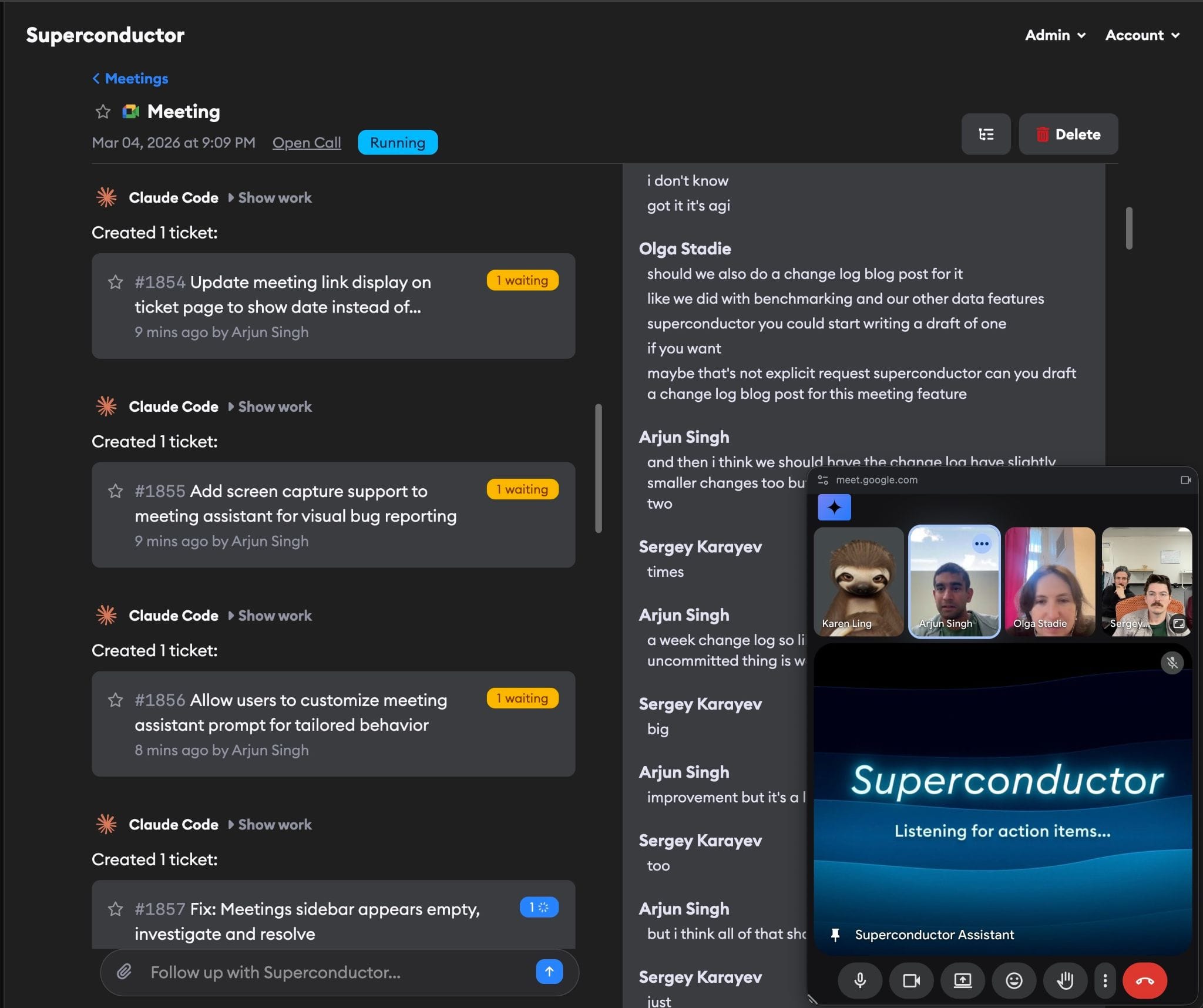
Invite Superconductor's meeting assistant to a Google Meet call and it turns the bugs and requests discussed into tickets during the call. Superconductor can start coding agents on those tickets before the call ends, and teammates on the call see the work in Superconductor.
Or email team@superconductor.com.
Superconductor lets you and your team chat with coding agents such as Claude Code, Codex, Pi, and more in shared, secure cloud sessions.
With our Google Meet integration, you can
- File tickets from the meeting discussion
- Start agents on new tickets before the call ends
- Ask the assistant to add a ticket it missed
Technical details
- Joins from
- A
meet.google.commeeting link - Creates
- Tickets, or links to existing ones, plus a live transcript
- Needs
- Private beta access; Owner, Admin, or Collaborator role
Example
Questions
- Does it transcribe the call?
- Yes. The meeting assistant keeps a live transcript with speaker names and timestamps, including meetings in more than one language.
- Who can see the transcript?
- All members of your Superconductor workspace can view meetings and transcripts. Creating meetings needs an Owner, Admin, or Collaborator role.
- Is it available now?
- It's in private beta. Use Request access on this page, or email team@superconductor.com.