
Hand off Linear issues to Superconductor's coding agents
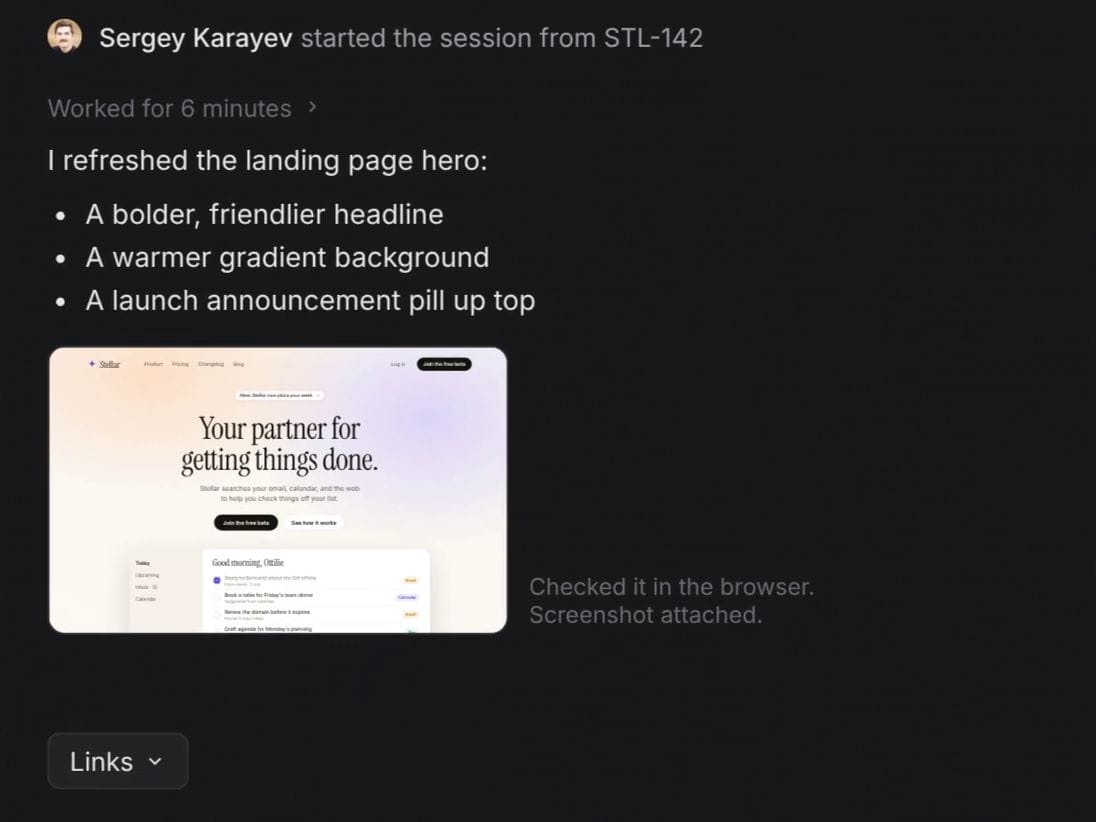
Connect Linear to Superconductor and a coding agent picks up an issue when a teammate assigns or @mentions Superconductor. Superconductor posts progress, the live preview, and the pull request back to the issue, where anyone on the team can reply to steer the agent.
Superconductor lets you and your team chat with coding agents such as Claude Code, Codex, Pi, and more in shared, secure cloud sessions.
With our Linear integration, you can
- Hand off small bugs during triage
- Reply in the issue thread to steer the agent
- Map each Linear team to a default project
Technical details
- Trigger
- Assign to Superconductor, or
@mentionit in a comment - Context
- The issue's details, plus your comment
- Result
- Progress, preview, and PR links in the issue thread
- Needs
- Owner or Admin installs, Linear admin approves; emails must match
- Also
- The Linear connector (MCP) lets agents read and file issues
Example
Questions
- How do I hand an issue to Superconductor?
- Assign it to Superconductor from the issue's assignee menu, or mention @Superconductor in a comment with instructions.
- Who can start work from Linear?
- Anyone whose Linear email matches a member of your Superconductor workspace. A workspace Owner or Admin installs the app, and a Linear admin approves it.
- Is this the Linear MCP server?
- No. This integration starts work from Linear issues. The separate Linear connector uses Linear's MCP server so agents can look up, create, and update issues while they work. Connect both to start work from an issue and let the agent file follow-ups.