
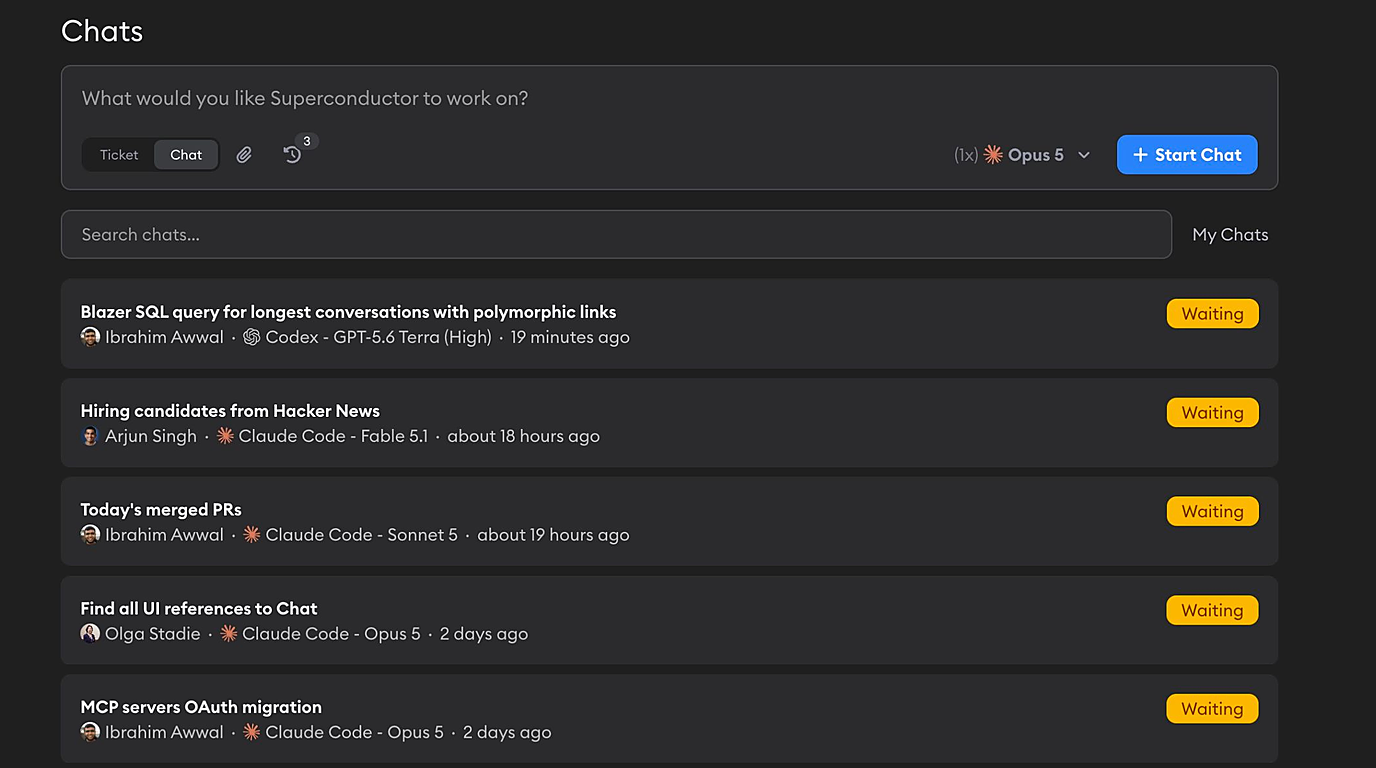
Not every question your team has about the codebase deserves a pull request. "Why is this endpoint slow?", "What breaks if we rename this table?", "Which recent PRs touched our sidebar?" — until now, answering those in Superconductor meant opening a ticket for work you never intended to ship.
Chats are for exactly that. A chat is a conversation with an agent that can read your project's repos and access its skills and MCPs, but is told not to change any code.

Start a chat from the same box you use to create tickets — just flip the toggle from Ticket to Chat. Then:
- The agent gets its own cloud sandbox with your repos on their default branches
- It gets your project's skills and MCP servers, so it can read your code and query Sentry, PostHog, Linear, Notion, or Jira in one answer
- It gets your project's dev environment and network rules
- Nothing is committed, pushed, or opened as a PR — there's nothing to review or clean up afterward
Chats live in the project and are visible to your whole workspace, so an answer one person went looking for becomes something the whole team can read, follow, and reply to.
Some cool ways to use chats
- Onboard a new teammate. "Walk me through how auth works across our repos, with a diagram." The chat stays in the project, so the next new hire reads it instead of asking again.
- Triage an incident together. With MCPs on, one chat can pull the Sentry issue, find the code that raised it, and say what changed recently — then your teammates jump into the same chat to ask follow-ups.
- Let PMs and designers scope work themselves. "How hard would it be to add voice input to the search bar?" gets a real answer from someone who has read the code, without pulling an engineer off their task.
- Ask for a deliverable. Agents save artifacts — ask for an architecture diagram, a Markdown write-up, or a report on recently lapsed users, then drop it into a ticket or download and share it in standup.
- Ask several agents the same question. Run the chat with up to 12 agents at once. Asking Opus 5, GPT-5.5, and Kimi K3 "how does our permissions system work?" and reading the answers side by side is the fastest way to compare agents on a real question from your own codebase.
Chats are now available in every project — click Chats in the project header, or hit Cmd/Ctrl+N in the desktop app. Read the docs for the full details.
What are you using chats for, and what's missing? Let us know — we'd love to hear your feedback.