
Run Muse Code as a team in Superconductor
Connect your Muse Code subscription or Meta API key to Superconductor and your whole team can run Muse Code on cloud computers everyone can watch. With Superconductor, your team can run Meta's Muse Wonder and Muse Spark next to Claude Code and Codex on the same ticket, and ship the best result.
Superconductor lets you and your team chat with coding agents such as Claude Code, Codex, Pi, and more in shared, secure cloud sessions.
With our Muse Code integration, you can
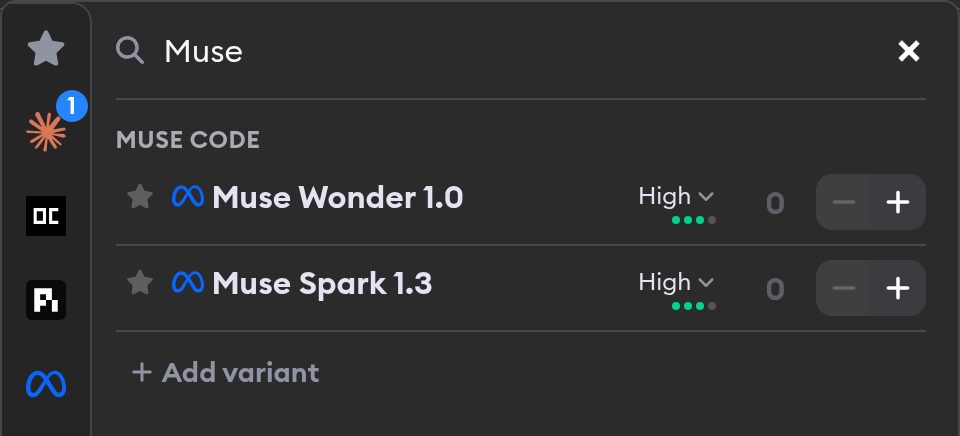
- Run Muse Wonder 1.0 or Muse Spark 1.3 at four reasoning levels
- Use your Muse Code subscription instead of paying per token
- Benchmark Muse Code on your own merged PRs
Try asking
- Write end-to-end tests for the password reset flow, and fix any bugs they turn up.
- Replace our hand-rolled date formatting with the Intl API across the app.
- Explain how the permissions check works in this codebase, with the files involved, before we change it.
Technical details
- Runs on
- Muse Code subscription or Meta API key
- Models
- Muse Wonder 1.0 and Muse Spark 1.3 at Medium, High, Extra High, Max
Example
Questions
- How do I connect my Muse Code subscription?
- In Account Settings, under Subscriptions, click Connect your Muse Code Subscription and approve the request on Meta's site. There's nothing to install or paste.
- Which does a run use if I have both a subscription and an API key?
- Your connected subscription comes first. If you haven't connected one, Superconductor uses the project's Meta API key, then the workspace key.
- What happens if my Muse Code subscription lapses?
- Muse Code stops running on it, and the subscription shows as no longer active. Renew it with Meta and connect it again.
- Can I use workspace credits with Muse Code?
- No. Muse Code needs a connected Muse Code subscription or a Meta API key.