Superconductor API
Create a personal access token so your local agents and scripts can read your Superconductor projects, tickets, implementations, and chats. More API functionality coming soon.
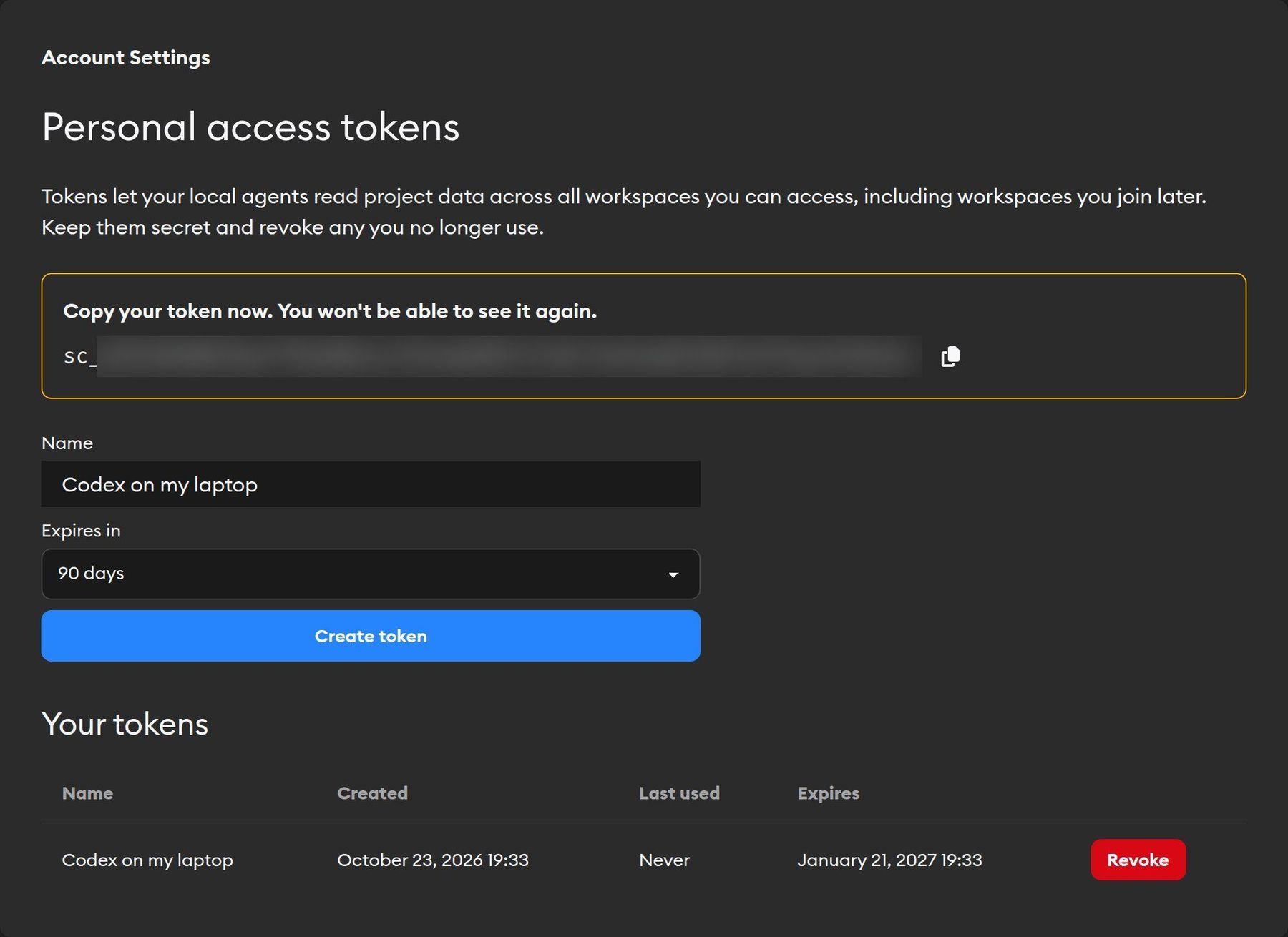
The Superconductor API lets tools outside Superconductor, like Codex or Claude Code on your laptop, Cursor, or your own scripts, read the work in your projects on Superconductor. You connect them with a personal access token: a separate password for one tool that you can revoke at any time without changing your account password.
The API is read-only for now, but more functionality is coming soon. Let us know what API functionality would be most helpful to you.
What you can do with it
The API is currently read-only. With a token, a tool can:
- List the Superconductor projects you can access
- Read tickets, their descriptions and statuses, and their implementations
- Read an implementation's conversation and code changes
- List project chats and read their conversations
For example, you could ask a local agent: "Find the Superconductor chat where I brainstormed the new onboarding flow, read the plan we agreed on, and implement it in this repo." Or have a script post a daily summary of which tickets moved forward.
The API cannot yet create tickets, launch agents, send messages, or open PRs. Do those in Superconductor.
What a token can access
A token acts as you. It can read everything you can see in Superconductor:
- Your own implementations and chats, and your teammates' work in the same projects
- Projects in every workspace you belong to, including workspaces you join after initially generating the token
You can't currently limit a token to one project or workspace. If you leave a workspace, your tokens lose access to it too.
Create a token
- Go to Account Settings and click Personal access tokens under Developer.
- Enter a Name so you can tell your tokens apart, like "Codex on my laptop".
- Choose when it expires under Expires in: 30, 60, or 90 days, or Never.
- Click Create token.
- Copy the token and store it somewhere safe, like your tool's secrets or an environment variable. You won't be able to see it again.
Tokens start with sc_. You can have up to 20 at a time.
Treat a token like a password. Anyone who has it can read your Superconductor work until it expires or you revoke it.
Manage and revoke tokens
The Your tokens table on the same page shows each token's name, when you created it, when it was last used, and when it expires.
Click Revoke to cut off a token. Any tool using it loses access immediately. We recommend giving each tool its own token, so you can revoke one without breaking the others.
Make your first request
Send your token as a bearer token. To check that it works, ask the API who you are:
curl https://www.superconductor.com/api/v1/user \
  -H "Authorization: Bearer $SUPERCONDUCTOR_TOKEN"
You'll get your name and email back:
{ "id": "7B9DnrkjmB8Q", "name": "Kevin Walsh", "email": "kevin@example.com" }Endpoints
All endpoints start with https://www.superconductor.com/api/v1 and return JSON. Use the IDs at the end of Superconductor URLs, like the implementation ID in /tickets/<ticket id>/implementations/<implementation id>.
| Request | What it returns |
|---|---|
GET /user | Your name and email |
GET /projects | Projects you can access, newest first |
GET /projects/{id}/tickets | A project's tickets, newest first |
GET /projects/{id}/chats | A project's chats, newest first |
GET /ticket_implementations/{id} | An implementation's status, agent, ticket, and pull requests |
GET /ticket_implementations/{id}/messages | An implementation's conversation |
GET /ticket_implementations/{id}/diff | An implementation's code changes, per repo |
GET /chats/{id} | A chat's details |
GET /chats/{id}/messages | A chat's conversation |
Filtering tickets and chats
The tickets and chats lists accept these query parameters:
sort=last_activitylists the most recently active first. The default iscreated.since=2026-10-01T00:00:00Zkeeps only items active since that time.include=implementationsadds each ticket's implementations (tickets only).
Pagination
Lists return up to 100 items per page in data. Add limit to get up to 1,000. If next_cursor isn't null, there are more results. Pass it back as cursor to get the next page:
curl "https://www.superconductor.com/api/v1/projects/{id}/tickets?limit=50&cursor=$NEXT_CURSOR" \
  -H "Authorization: Bearer $SUPERCONDUCTOR_TOKEN"
Troubleshooting
401 Unauthorized
The token is missing, mistyped, expired, or revoked. Check that the header is Authorization: Bearer sc_..., or create a new token.
404 Not found
Either the ID is wrong or you don't have access to that project, ticket, implementation, or chat. The API doesn't reveal whether something exists if you can't see it.
Next steps
- Account settings: where you create and revoke tokens
- Workspaces: who can access which projects