Lifecycle
Understand what runs when a snapshot is built and when a development environment starts, pauses, and resumes.
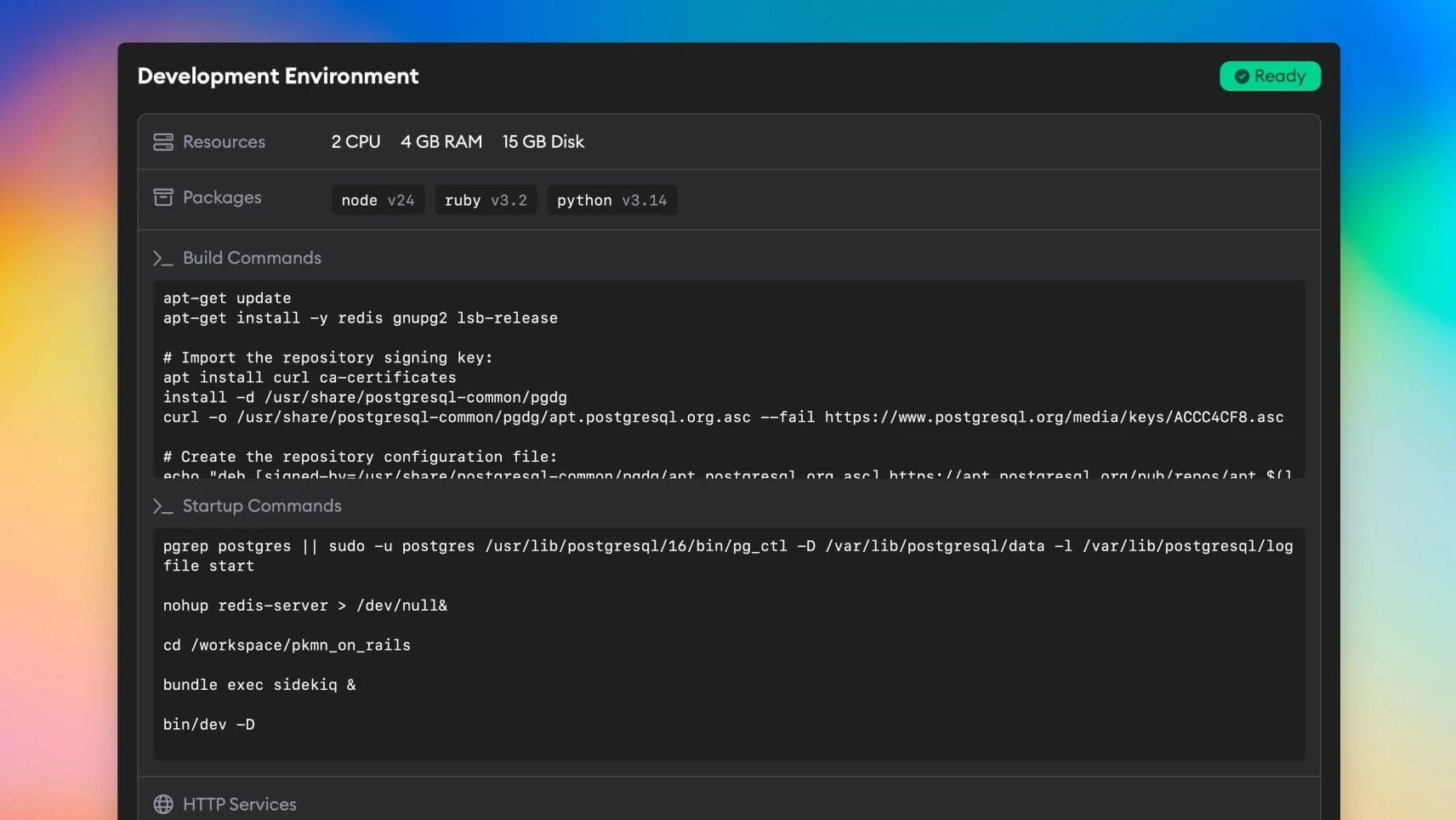
Every implementation runs in its own development environment. The environment starts from your project's saved snapshot, applies the ticket branch, starts your services, and then hands control to the coding agent.
This page explains the order of operations and the guarantees Superconductor makes around build commands, startup commands, and agent execution.
Lifecycle overview
| Phase | When it runs | What happens |
|---|---|---|
| Snapshot build | When you first configure the environment, or rebuild the snapshot after changing build settings | Superconductor starts a temporary build environment, clones your repos, installs selected packages, runs build commands, and saves a new snapshot. |
| Environment start | When an implementation or preview environment starts from that snapshot | Superconductor starts a fresh development environment from the saved snapshot. |
| Initialization | Before startup commands | Superconductor prepares your repositories, credentials, and implementation branch. |
| HTTP service setup | Before startup commands | Superconductor exposes your configured HTTP services and creates service hostname environment variables. |
| Startup commands | Before the agent begins work | Superconductor runs your startup commands in order. Foreground commands must finish. Background commands are launched and then the lifecycle continues. |
| Network access rules | After startup commands have completed or launched | Superconductor applies your project's network access settings. |
| Agent execution | After network access rules are applied | The selected agent runs against the initialized repo and running services. |
| Pause and resume | When the environment goes idle or is reopened | Superconductor pauses the development environment to save compute. On resume, startup commands run again. |
Snapshot builds
Build commands run while creating the environment snapshot. Use them for one-time setup that should be reused by future implementations:
- installing dependencies
- setting up databases
- building assets
- writing files that should exist in every future development environment
- installing tools that should be captured in the snapshot
During a snapshot build, Superconductor:
- Starts a temporary build environment.
- Installs the packages selected in your environment settings.
- Clones your project repos into
/workspace. - Runs build commands in order.
- Saves the resulting filesystem as the project snapshot.
Build commands are synchronous. If a build command fails, the snapshot build fails and implementations keep using the last completed snapshot.
Changes to build settings require a new snapshot build before new implementations see them.
Environment startup
When an implementation starts, Superconductor starts a fresh development environment from the latest completed snapshot. Then it prepares the environment before your startup commands run.
This includes setting up git access, checking out the implementation branch, and exposing configured HTTP services for live preview.
HTTP service host variables are available before startup commands run. For example, a service named web gets AGENT_WEB_HOST.
Startup commands run after this initialization and before the coding agent begins work.
Network access rules are applied after startup commands have completed or launched. This means build commands and startup commands can do setup work before blocked network access takes effect; the coding agent runs after the network rules are enforced.
Startup commands
Startup commands run each time a development environment starts or resumes. Use them for runtime processes and per-session setup:
- app servers
- worker processes
- file watchers
- local service boot commands
- setup that must happen every time the development environment starts
Startup command blocks run in order. Each block runs in its own shell.
Foreground startup commands block the lifecycle until they exit successfully. Background startup commands are launched with logging, marked as launched, and then Superconductor continues to the next command.
The last startup command always runs in the background. This keeps long-running app servers from blocking agent execution forever.
Pause and resume
Development environments pause automatically when idle. A paused environment keeps its filesystem state, including code changes made during the implementation, but running processes are not kept alive.
When the environment resumes, Superconductor runs startup commands again so your app servers, workers, and file watchers come back up.
If a command starts a long-running process, keep it as a background startup command.
Secrets and environment variables
Secrets with Export to Environment enabled are available to build commands, startup commands, terminal sessions, and agent executions as $SECRET_NAME.
Secrets referenced inline with {{ secrets.SECRET_NAME }} are substituted only in the command block where you reference them.
Each command block runs in its own shell, so a plain export inside one block does not carry over to later blocks. Use Export to Environment for values that multiple commands or agents need.
Superconductor also sets:
AGENT_WORKSPACE_DIR=/workspaceduring build commandsAGENT_<SERVICE_NAME>_HOSTfor each configured HTTP service during startup commands and agent executionSC_<SERVICE_NAME>_AUTHENTICATED=truewhen a service is protected by Superconductor preview authenticationSC_IDENTITY_TOKEN_FILEduring startup commands, terminal sessions, and agent executions. Read this file to get a short-lived signed JWT for the running Superconductor workload.
Services that need to verify Superconductor identity tokens can use /.well-known/jwks.json for public signing keys. OIDC-style issuer metadata is available at /.well-known/openid-configuration.
What is guaranteed
Superconductor guarantees:
- Build commands run before a snapshot is saved.
- New implementation environments start from the latest completed snapshot.
- Superconductor initialization runs before startup commands.
- HTTP service host variables are available before startup commands.
- Startup commands run before the agent starts working.
- Foreground startup commands are waited on.
- Background startup commands are launched before the lifecycle continues.
- Project network access rules are applied after startup commands and before agent execution.
- Startup commands run again after a paused environment resumes.
Superconductor does not guarantee:
- that undocumented internal file paths or installed binary locations will never change
- that a background process is healthy, only that the command was launched
- that
exportstatements in one command block are available in another block - that changes to build settings affect existing running development environments
Choosing build vs startup commands
| Use build commands for | Use startup commands for |
|---|---|
| Dependency installation | App servers |
| Database setup | Workers and queues |
| Asset builds | File watchers |
| Tools you want saved in the snapshot | Per-session setup |
| One-time filesystem setup | Commands that should rerun after resume |
If a command must be present in every future development environment and does not need to rerun after pause, put it in build commands. If it must happen each time the environment starts, put it in startup commands.